
Why Android 15 Downloads .ogg Files as .ogg.ogx – A MIME Type Analysis
TLDR: Many web servers, including Wikimedia and Wikia, send .OGG and .OPUS files with the outdated application/ogg content type. Android 15 has adjusted the logic of file extensions and now creates .ogg.ogx files in the download folder. The .ogx file extension is not commonly encountered. The solution is to correctly name the MimeTypes in the server configuration.
I have received many user enquiries about .ogx files at file-converter-online.com. This surprised me, as .ogx is an extremely rare file extension. The real-world use cases are virtually nonexistent. In fact, I have never come across an actual .ogx file “in the wild”.
Later, I noticed that some of the files provided to me for examination had an unnoticed double file extension. I saw .ogg.ogx or .opus.ogx. Through research and further contact with the users, I was able to learn more about the sources and the files themselves.
The analysis:
Initially, I found some references to bugs in Drupal[7], and some Wikia users also complained[8]. My attention quickly turned to a mix-up of MIME types. With the history of the .ogg file extension (and its change) in mind, I dug deeper.
I discovered that some web servers use application/ogg as the default content type for .opus or .ogg files, including Wikimedia and Fandom/WikiA.
curl -I https://upload.wikimedia.org/wikipedia/commons/4/42/Echo_samples.ogg
HTTP/2 200
content-type: application/ogg
content-length: 126498
curl -I https://static.wikia.nocookie.net/soundeffects/images/3/35/Sound_Ideas%2C_CARTOON%2C_LAUGHTER_-_HIGH_PITCHED_CRAZY_LAUGHTER_01.ogg/revision/latest
HTTP/2 200
date: Wed, 11 Mar 2026 19:36:55 GMT
content-type: application/ogg
content-length: 67089
The cause:
Most browsers handle this well, but Android's guessFileName method, and in particular guessFileNameRfc6266, leads to a contradiction: the file name specifies .ogg, but the MIME type maps to .ogx.[10] Therefore, the .ogx extension is appended and not replaced, and we have created the duplicate and nonsensical file extension.
// guessFileName
        if (android.os.Flags.androidOsBuildVanillaIceCream()) {
            if (Compatibility.isChangeEnabled(PARSE_CONTENT_DISPOSITION_USING_RFC_6266)) {
                return guessFileNameRfc6266(url, contentDisposition, mimeType);
            }
        }

// guessFileNameRfc6266
        if (mimeType != null && extensionDifferentFromMimeType(filename, mimeType)) {
            return filename + extensionFromMimeType;
        }
The source code also shows that this behaviour only occurs from Android 15/Vanilla Ice Cream onwards:
The function also changed in the following ways in VANILLA_ICE_CREAM:
If the suggested file type extension doesn't match the passed mimeType, the method will append the appropriate extension instead of replacing the current extension.
The assessment:
In principle, this is not a bug in Android but a common configuration problem in web servers. .ogg files should also be sent with the current content type: audio/ogg, not application/ogg. If the .ogg file actually contains video, video/ogg would be the ideal content type, or even better, video/ogg and .ogv as the file extension. I was unable to reproduce this behaviour on desktop browsers (Firefox, Chrome, Safari).
The .ogx files can be played back without any problems on the affected Android devices. It only becomes “problematic” when the files are shared.
If we look closely at the RFC, we see in RFC 5334:
[3]
The type “application/ogg” is redefined.
and
Applications which use this media type: Scientific and otherwise that require various multiplexed signals or streams of data, with or without scriptable control of content.
This is no longer consistent with the MDN recommendation for providing Ogg media:
If you do not know whether the Ogg file contains audio or video, you can serve it with the MIME type application/ogg, and the browser will treat it as a video file.
We can see that changes in MIME types are now causing problems after 18 years. Old configuration files that never used to be a problem are suddenly causing problems.
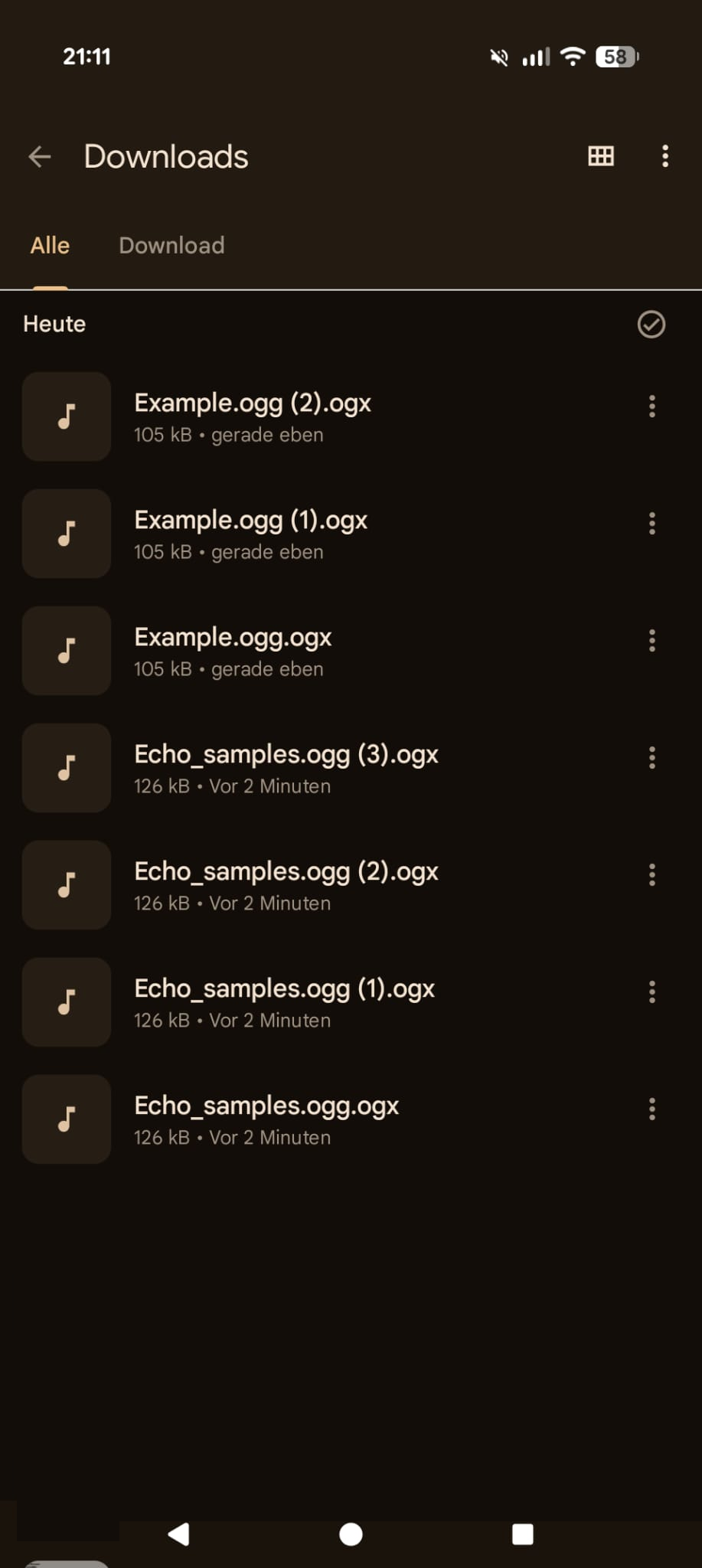
Screenshot of the downloaded .ogg files with incorrect file extensions
Sample data and further information:
Examples of OGX files with audio content, kindly provided for analysis:
# file *.ogx
1.ogx: Ogg data, Opus audio,
2.ogx: Ogg data, Vorbis audio, mono, 44100 Hz, ~86000 bps, created by: Xiph
3.ogx: Ogg data, Vorbis audio, stereo, 44100 Hz, ~160000 bps
4.ogx: Ogg data, Vorbis audio, stereo, 44100 Hz, ~160000 bps, created by: Xiph
For comparison, free sample data with .ogg and .ogv extensions:
# file sample.ogg
sample.ogg: Ogg data, Opus audio,
# file sample.ogv
sample.ogv: Ogg data, Theora video
The solution for end users:
In principle, it is sufficient to remove the duplicate file extension or change .ogx to .ogg. file-converter-online.com also does this in the background, provided that a .oga or .ogg file is recognised behind the .ogx file.
The fix for server operators:
In the Apache configuration, the assignment must be made in .htaccess or mime.conf. The following entries are required for correct implementation:
.htaccess or mime.conf – Apache
AddType audio/ogg .ogg .oga .spx .opus
AddType video/ogg .ogv
AddType application/ogg .ogx
The nginx configuration should also define application/ogg only for ogx.
mime.types – nginx
audio/ogg  ogg oga spx opus;
video/ogg  ogv;
application/ogg  ogx;
It was an exciting journey from poring over documentation, the history of Xiph.Org, MIME mappings in Apache and nginx, and Android source code, to the realisation that an extension of file extensions almost 20 years ago provides the basis for today’s “problem”. It is also interesting to note how many web servers (from very large projects) are actually misconfigured. And a – presumably minor – improvement in Android 15 actually highlights the problem.
Reproduction:
Download an .ogg file from (as of March 2026) Wikimedia or Wikia with Android 15+. Android will save a file in the extremely unusual .ogx format with a double file extension: .ogg.ogx. Before doing so, use Curl or your browser to validate whether the content type: application/ogg is still being sent.
I would appreciate further information on the creation of .ogx files in the comments or via the contact form.
Sources
[1] URLUtil.java via Android GoogleSource
[2] MDN – Configuring servers for Ogg media
[3] RFC 5334 – “Ogg Media Types” (IETF, 2008): https://www.rfc-editor.org/rfc/rfc5334
[4] RFC 6266 – “Use of the Content-Disposition Header Field in the Hypertext Transfer Protocol (HTTP)” https://www.rfc-editor.org/rfc/rfc6266
[5] RFC 3533 – “The Ogg Encapsulation Format Version 0”: https://www.rfc-editor.org/rfc/rfc3533
[6] Xiph.Org Wiki – MIME Types and File Extensions: https://wiki.xiph.org/MIME_Types_and_File_Extensions
[7] Drupal Issue #1239376 – MIME confusion
[8] Discussion at Wikia – MIME confusion
[9] URLUtil.GuessFileName Microsoft .NET for Android documentation
[10] Android MIME-Type Mapping (via external/mime-support)
Author: Sören Ramspeck, developer and owner of file-converter-online.com, an online file converter in 17 languages with more than 127 million converted files. About the author.
No Comments