
All about JXL files
the planned successor to JPEG, which won't be easily beaten
 Last updated on April 25, 2026 by Sören Ramspeck with the experience of more than 129,921,486 converted files since 2013.
There have been many attempts to replace JPEG: WDP, JXR, JPEG-2000—all of them failed. JPEG XL faced almost the same fate, but in late 2025/early 2026, the tide turned (once again): Google will support JPEG XL in Chrome after all.
JXL as the successor to JPEG
JPEG XL (file extension .jxl) has arrived to replace JPEG and has everything needed to do so. The format combines lossless and lossy compression into a single, royalty-free standard, delivering even better results than JPEG, PNG, and WEBP. Developed by the Joint Photographic Experts Group (JPEG) and standardized as ISO/IEC 18181, JPEG XL is intended to replace traditional image formats in the long term [1]. The "L" stands for Long-Term, and the "X" was adopted from other JPEG extensions (XR, XT, …).
What makes JPEG XL special?
JPEG XL isn’t “just a little more JPEG.” It’s an extremely modern image format that aims to solve several problems at once. In lossy mode (like JPEG), JPEG XL files are typically 50 to 60% smaller than conventional JPEGs at comparable quality. Compared to the equally modern AVIF format, JPEG XL cannot always produce smaller files, but it does offer faster encoding speeds.
The real highlight: JPEG XL can recompress existing JPEG files without any further loss of quality, saving around 20% in storage space [3]. No loss of quality, no artifacts—just 20% less storage required. For websites with many images, 20% is a massive savings.
Furthermore, JPEG XL offers features that no other common web image format supports in this combination: progressive decoding (the image builds up from coarse to fine details instead of loading line by line), HDR support with up to 32-bit color depth, wide color spaces (Display P3, Rec. 2100), and transparency (alpha channel) [1]. Furthermore, images can have a height and width of up to 1 billion pixels, unlike JPEG, which is limited to 65,535×65,535 pixels.
The Turbulent History of JPEG-XL
The development of JPEG XL began in 2017 with a call for proposals from the JPEG Group [3]. Two promising approaches, Google’s PIK and Cloudinary’s FUIF, were merged and culminated in the final standard in 2022. So far, so standard.
The more exciting story unfolds in the browsers: Chrome and Firefox offered experimental support behind a feature flag starting in 2021 [3]. But then, in October 2022, came the bombshell: Google removed JXL support from Chrome, citing “insufficient interest in the ecosystem” and citing security concerns [5]. Over 1,000 upvotes and numerous outraged comments in the Chromium bug tracker, however, saw things differently [6]. Critics suspected that Google would rather push its own AVIF format (via the Alliance for Open Media) than pave the way for an independent standard [3].
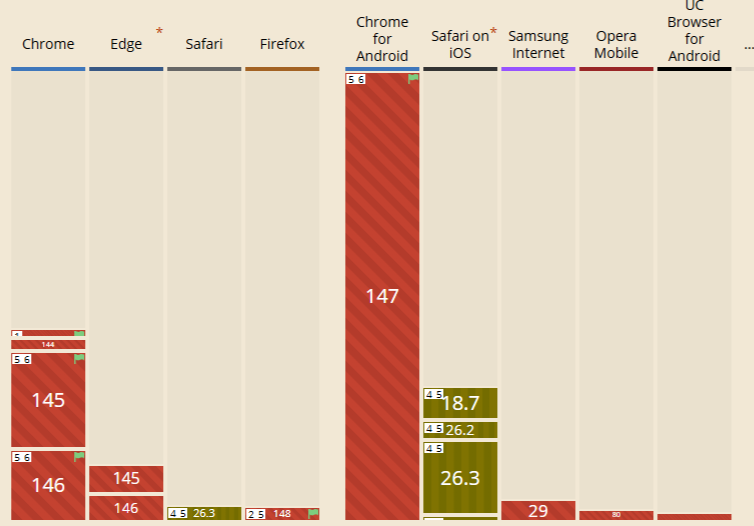
What followed was a three-year battle by the community. Apple officially adopted JPEG XL in Safari in 2023, and the iPhone 16 Pro uses the standard in Apple’s ProRaw. Mozilla shifted from a negative stance to a neutral one and began work on a Rust-based decoder [1], which then also addressed the security concerns. By the end of 2025, Google finally relented: the Chromium status was changed from "Obsolete" to "Assigned," and in February 2026, Chrome 145 was released (once again) with a built-in JXL decoder [2]. The inclusion of JPEG XL in the PDF specification likely also contributed to Google’s change of heart [5]. As of April 2026, the JPEG XL feature still needs to be manually enabled in both Chrome and Firefox.
Browser and Software Support (as of 2026)
| Software | JXL Support | Note |
|---|---|---|
| Safari | Version 17 and later (2023) | Native, a pioneer among browsers |
| Chrome | Starting with version 145 (Feb. 2026) | Rust decoder, still behind flag [2] |
| Edge | Starting with version 145 | Chromium-based, same decoder |
| Firefox | Nightly (starting in 2026) | Flag required, stable version pending [1] |
| Windows | Via plugin | Plugin available for Explorer, photo viewer, etc. [1] |
| macOS / iOS | Native | Quick Look, iPhone 16 Pro (ProRAW) |
| Ubuntu | as of 04/25 | Enabled by default [1] |
| GIMP | Plugin for 2.10 | Fully functional |
| IrfanView | 4.59 and up | Plugin required [7] |
| XnView MP | Supports | Open and edit |
| Paint.NET | Starting with 5.1.5 | Native, previously via plugin [7] |
| Photopea | Native import | Export via plugin |
Install JPEG XL support in Windows 11
Currently, you still need to install the following extension to enable JXL support in Windows 11: JPEG XL – Microsoft Store.
JPEG XL vs. AVIF vs. WebP
A comparison of the three modern web image formats:
AVIF (based on the AV1 video codec) offers very good compression but is slow during encoding, supports neither progressive decoding nor lossless JPEG recompression, and is limited to image sizes of 8,192 x 8,192 pixels; in some cases, 65,536 x 65,536 pixels are possible. [4]
WebP (Google’s older image standard) was a good first step and has broad browser support. However, its compression lags significantly behind JPEG XL and AVIF, and it also has limitations in terms of color depth (maximum 8 bits).
JPEG XL combines the strengths of both formats: best-in-class compression at practical speeds, progressive decoding, lossless JPEG recompression, HDR, wide color spaces, and images up to one billion pixels [1]. The only drawback so far has been patchy browser support. I expect the feature flags in Firefox and Chrome to be enabled before the end of 2026, and adoption to rise rapidly.
Key technical specifications of JXL
JPEG XL is based on a combination of block-based DCT encoding (for lossy mode, similar to classic JPEG) and a "modular mode" for lossless compression and synthetic image content [1]. ANS (Asymmetric Numeral Systems) is used for entropy coding—a modern method that is both fast and efficient.
The format supports color depths ranging from 8 to 32 bits per channel, variable color subsampling (4:4:4, 4:2:2, 4:2:0), ICC color profiles, metadata (EXIF, XMP), animations, and even multiple layers in a single file. The reference implementation is libjxl (C++); in addition, there is jxl-rs, a decoder written in Rust that is now used in both Chrome and Firefox [1].
Converting JXL
Despite growing support, there are still plenty of situations in 2026 where conversion is necessary: older browsers and operating systems with no or inactive JXL support, social media platforms that do not (yet) accept the format, or workflows with software that does not recognize JXL. In these cases, converting to JPEG (for maximum compatibility and small file sizes), PNG (when transparency or lossless quality is required), or WEBP (for web use) is helpful. Conversion with file-converter-online.com is fast and secure, requires no software installation, and is free.
Personally, I’m delighted that the community has succeeded in getting Google back on the JPEG XL track. JPEG XL is an excellent format with many positive features and will, hopefully, not disappear back into the drawer after a short time, just like JPEG-2000 or JPEG XR.
Sources
[1] Wikipedia: JPEG XL
[2] Phoronix: Chrome 145
[3] JPEG: JPEG XL Whitepaper
[4] Wikipedia: AVIF
[5] Phoronix: Google Looks To Bring JPEG-XL Support Back To Chrome / Chromium
[6] issues.chromium.org: JPEG XL decoding support (image/jxl)
[7] JPEG XL Software Support
Convert, open and edit JXL files
Details about JXL files
- Software for opening JXL files
- GIMP Adobe Photoshop
- Software for editing JXL files
- GIMP
- MIME-type for JXL
- image/jxl
No Comments